How can we help?
Pick a topic below to find answers about orders, returns, warranty, and using the VitalTac VT-1.
Order status, tracking, address changes, and how fast packages arrive.
Our 30-day return window and how refunds are processed.
The 1-year limited warranty, what it covers, and how to file a claim.
First-time charging, mode cycling, beam adjustment, and the battery.
Choosing modes, care for the lens and seals, storage, and operating temperatures.
Email, phone, hours, and our mailing address in Sheridan, Wyoming.
Getting started with your VitalTac.
The five things most people ask in the first ten minutes after opening the box.
The 21700 cell ships pre-installed and partially charged. Plug the included USB-C cable into the port behind the rubber flap on the body, and into any 5 V / 2 A USB-C charger. The indicator turns solid green when the cell is full — approx. 3.5 hours from empty. You can use the light while it’s charging, though brightness will be limited to keep the cell cool.
From off, a single click of the tail switch turns the light on at the last-used brightness. While the light is on, a quick second click cycles to the next mode (Low → Medium → High → Low). A long press of about one second from off accesses Strobe.
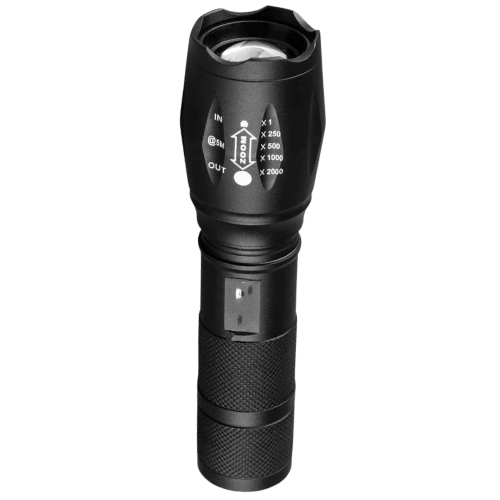
Hold the body firmly and slide the head forward to focus the beam into a tight spot for distance, or slide it back for a wide flood for close-up work. The adjustment is fully mechanical — no electronics in the bezel.
Unscrew the tail cap counter-clockwise. The 21700 cell slides out, positive (+) end toward the head. Replacements are available from any reputable retailer that sells protected 21700 cells. When inserting a fresh cell, line up the positive end with the marking inside the body and screw the tail cap back on snug — finger-tight is sufficient.
First, confirm the tail cap is screwed on tightly. If the cell has run flat, the indicator will blink red when you click the switch — plug it in over USB-C and let it charge for at least ten minutes before trying again. If neither resolves it, email support and we’ll help troubleshoot or arrange a warranty claim.
Modes, care, and day-to-day use.
Practical guidance for getting more out of the light and keeping it in good shape.
Low is for close-up tasks — reading, finding a light switch, working under a sink — where the long 30-hour runtime matters more than peak brightness. Medium is the everyday mode for walking outside, taking the trash out, or navigating a power outage. High is reserved for short bursts where you need the full 1,200 lumens — searching outside, identifying something at distance, or working in a wide dark area.
Wipe the AR-coated lens with a soft microfiber cloth — the same kind you’d use on eyeglasses or a camera. For stuck-on grime, dampen the cloth with a small amount of isopropyl alcohol. Do not use ammonia-based cleaners, scouring pads, or paper towels; they can scratch the coating.
Yes, if you store the light indoors at room temperature. For storage longer than a few months, charge the cell to about 50% — long-term storage at 100% or near-empty shortens lithium-ion lifespan. Avoid leaving the light installed in a hot vehicle or unheated shed.
Wipe the body dry, screw the tail cap on snug, and store the light indoors. The included belt holster works well for daily carry; the original box is fine for long-term storage. Check the rubber tail-cap O-ring once or twice a year and replace it (a spare ships in the box) if it shows wear or cracks.
The operating range is -4 °F – 122 °F (-20 °C – 50 °C). Below freezing, lithium-ion cells deliver less capacity — runtime drops noticeably below 32 °F and recharging below freezing is not recommended. In hot conditions above 122 °F, the light steps output down to protect the LED from overheating.
Email support@vitaltacofficial.com or visit our contact page.
Monday – Friday, 9:00 AM – 5:00 PM ET. Average response time is under one business day.